Your stages, your words
The pipeline follows how you sell, instead of the other way round.
- Name your own stages, statuses and dispositions
- Add custom fields to the deal form
- Renaming a stage later does not rewrite the history
Sales pipeline
See every deal by stage, what each stage is worth, and which deals have stopped moving.
Sales pipeline management means tracking each deal through the stages of your sales process, so you can see what is likely to close and what needs attention. Here, you name the stages, and the pipeline shows the count and value in each.
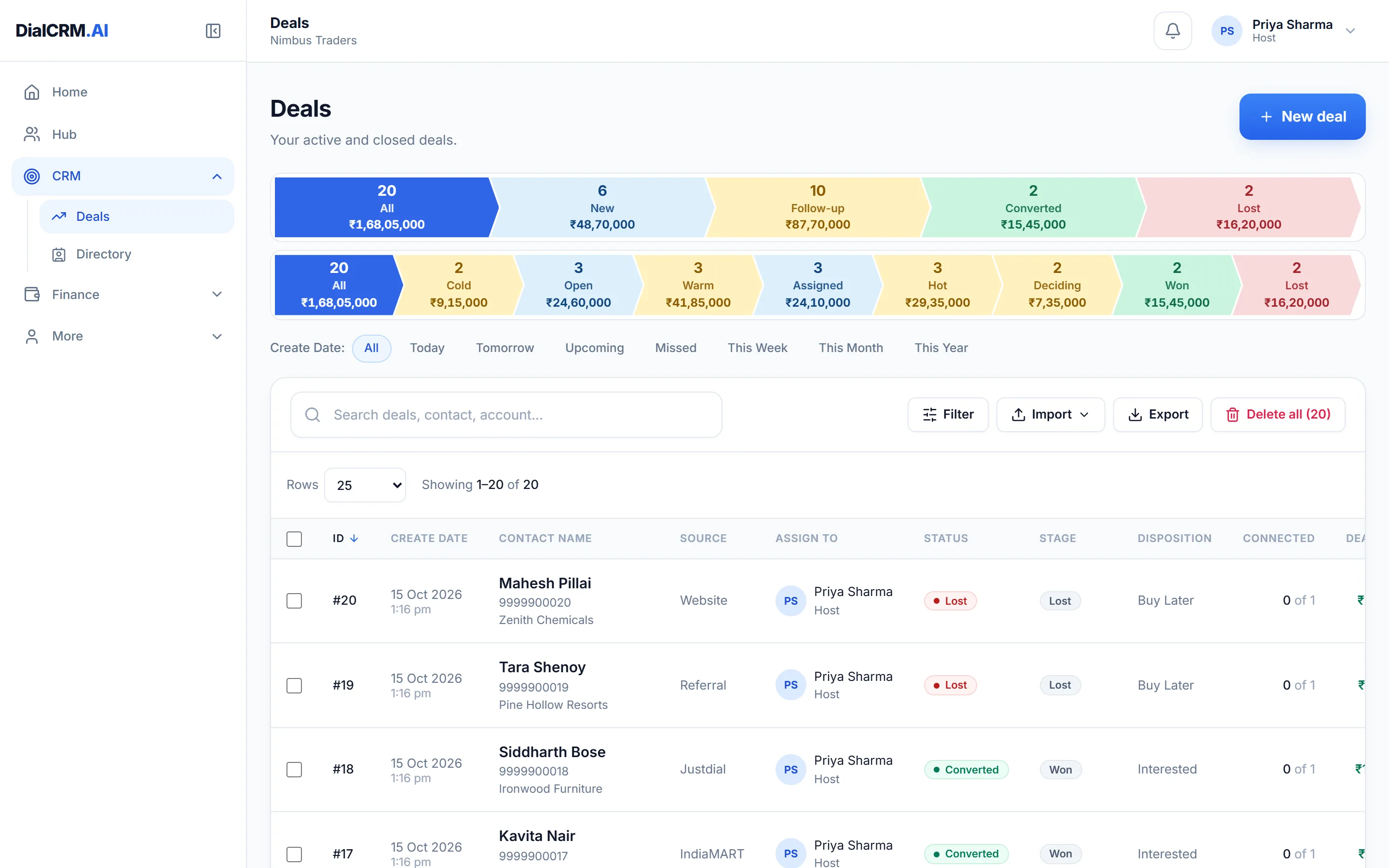
The pipeline follows how you sell, instead of the other way round.
The list and the dashboard both show where things stand.
A deal stalls when nobody is due to do anything next.
Questions
A sales pipeline shows each deal at its current step in your sales process, from first enquiry to won or lost. It tells you what is in progress and what is worth chasing next.
Yes. Stages are configurable per workspace, and renaming one does not change what the history says happened.
Yes. Each stage shows its count and amount, and the dashboard shows the funnel with the money at each stage.
Create a workspace, connect a source, and watch the pipeline fill with your real customers.
Get started free